Download Assessment Reports
SwyftComply AI allows users to download assessment reports after at least one AI Pen-Test cycle has been completed. Reports can be downloaded from the Application View or the Cycle History section.
Download Reports from the Application View
The Application View provides quick access to the latest assessment reports for the selected application.
To download a report:
- Navigate to SwyftComply AI.
- Select the required application from the Critical Applications table.
- The Application View opens.
- Locate the report download section.
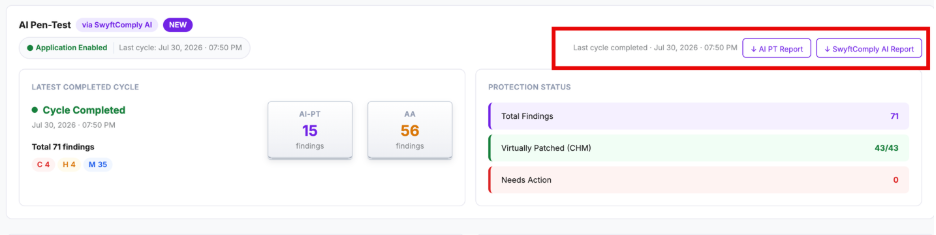
Click the required report:
- AI PT Report – Downloads the detailed AI-assisted penetration testing report.
- SwyftComply AI Report – Downloads the consolidated remediation report, including vulnerability findings, virtual patching status, and remediation summary.
The selected report is downloaded to your local system.
The page provides the following report options.
| Report | Description |
| AI PT Report | Download the detailed penetration testing report containing vulnerabilities identified by the AI Pen-Test engine. |
| SwyftComply AI Repor | Download the consolidated remediation report, including AI Pen-Test findings, virtual patching status, and remediation summary. |
These reports can be shared with internal security teams, auditors, compliance teams, or application owners.
Download Reports from Cycle History
The Cycle History section allows users to download reports for previously completed assessment cycles.
To download a report for a previous cycle:
- Navigate to SwyftComply AI.
- Select the required application.
- Scroll down to the Cycle History section.
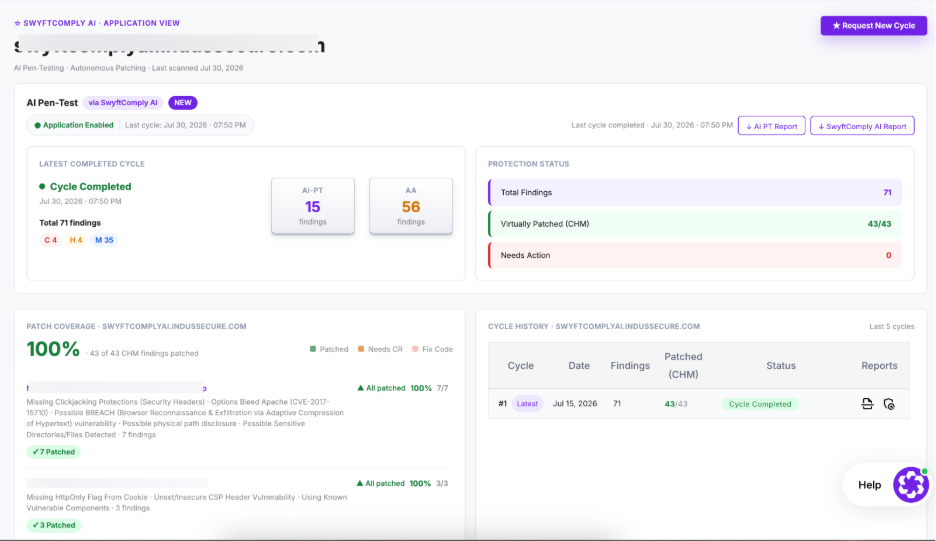
- Locate the assessment cycle for which you want to download the report.
Click the Download Report icon in the Reports column.
- The report for the selected assessment cycle is downloaded.
Reports are available only after a SwyftComply AI cycle has completed successfully. If the assessment is still In Progress or Protection In Progress, the download options are not displayed.