---
title: "API Key Based - Scan Log Export"
url: "https://docs.indusface.com/en/article/api-key-based-scan-log-export"
language: "en"
last_updated: "2025-03-04T10:52:08.250Z"
---
# API Key Based - Scan Log Export
Indusface WAS facilitates effortless transmission of scan logs to third-party applications like SIEM and 3rd party databases, allowing thorough analysis.
AppTrana WAS facilitates Scan Log configuration in two methods:
**AWS Access ARN Based:** This method allows customers to securely access scan logs by integrating Indusface AWS3 with their AWS S3 using Amazon Resource Name (ARN). Click here to get configuration details.
**API Key Based:** Alternatively, customers can opt for the API Key Based configuration. It offers simplicity and flexibility, eliminating the need for complex authentication like ARN.
### API Key-Based Configuration
This method enables customers to retrieve scan logs by calling an API with key-based authentication, and the keys can be generated within the platform.
These keys serve as authentication credentials, enabling secure communication between Indusface WAS and the third-party platforms.
**Follow these steps to create a set of API keys:**
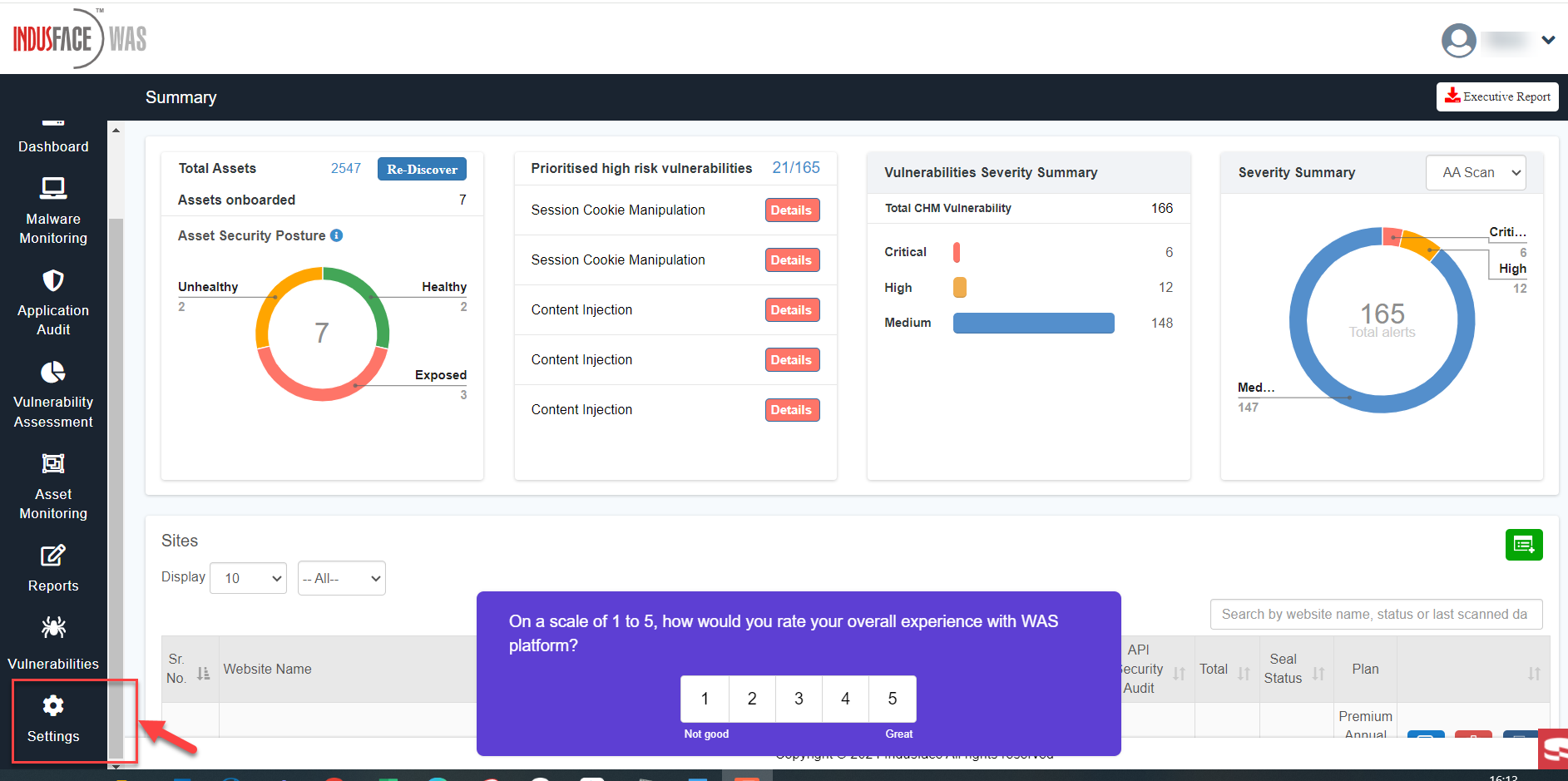
- Log in to your **Indusface WAS** account and go to **Settings.**
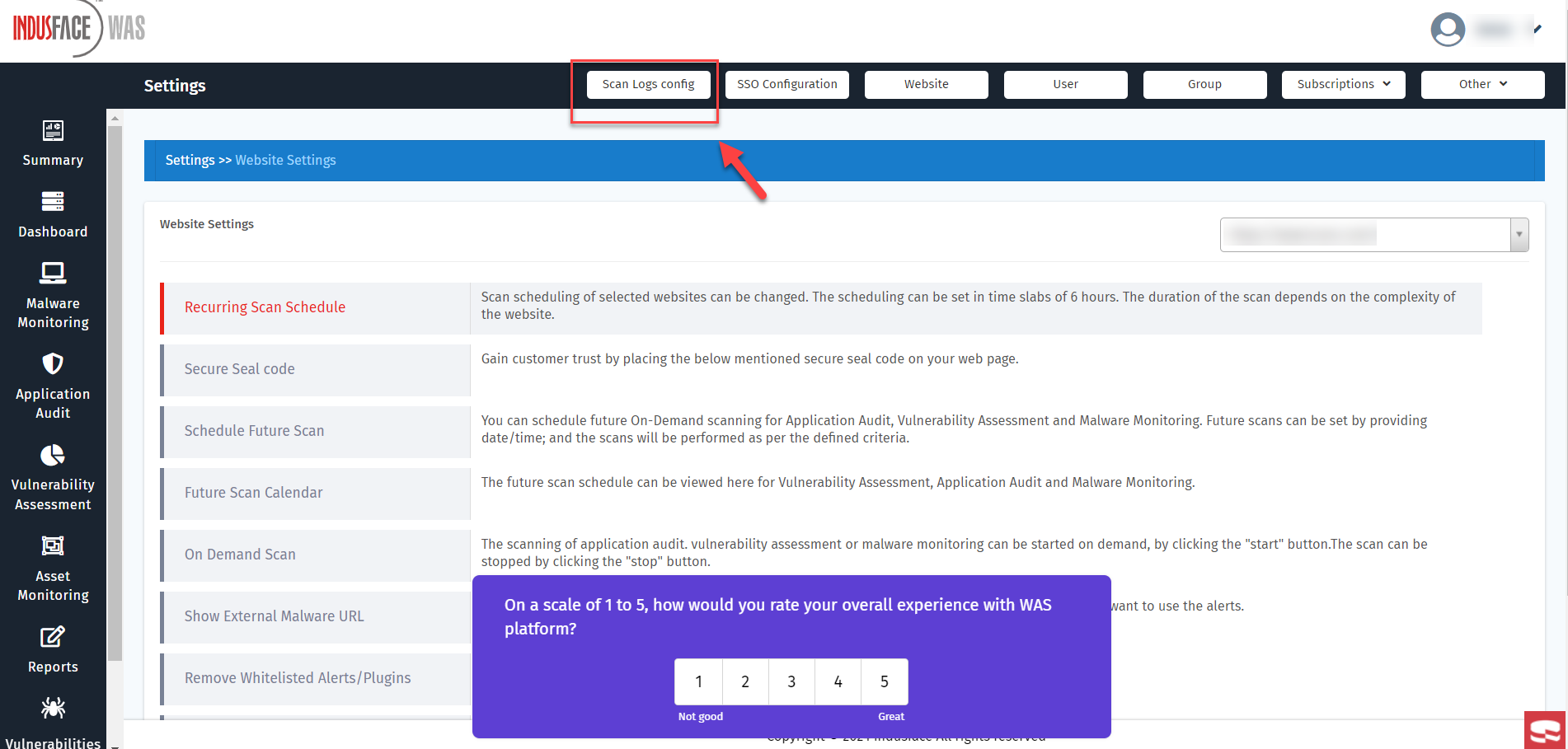
- Navigate to **Scan Log Config.**
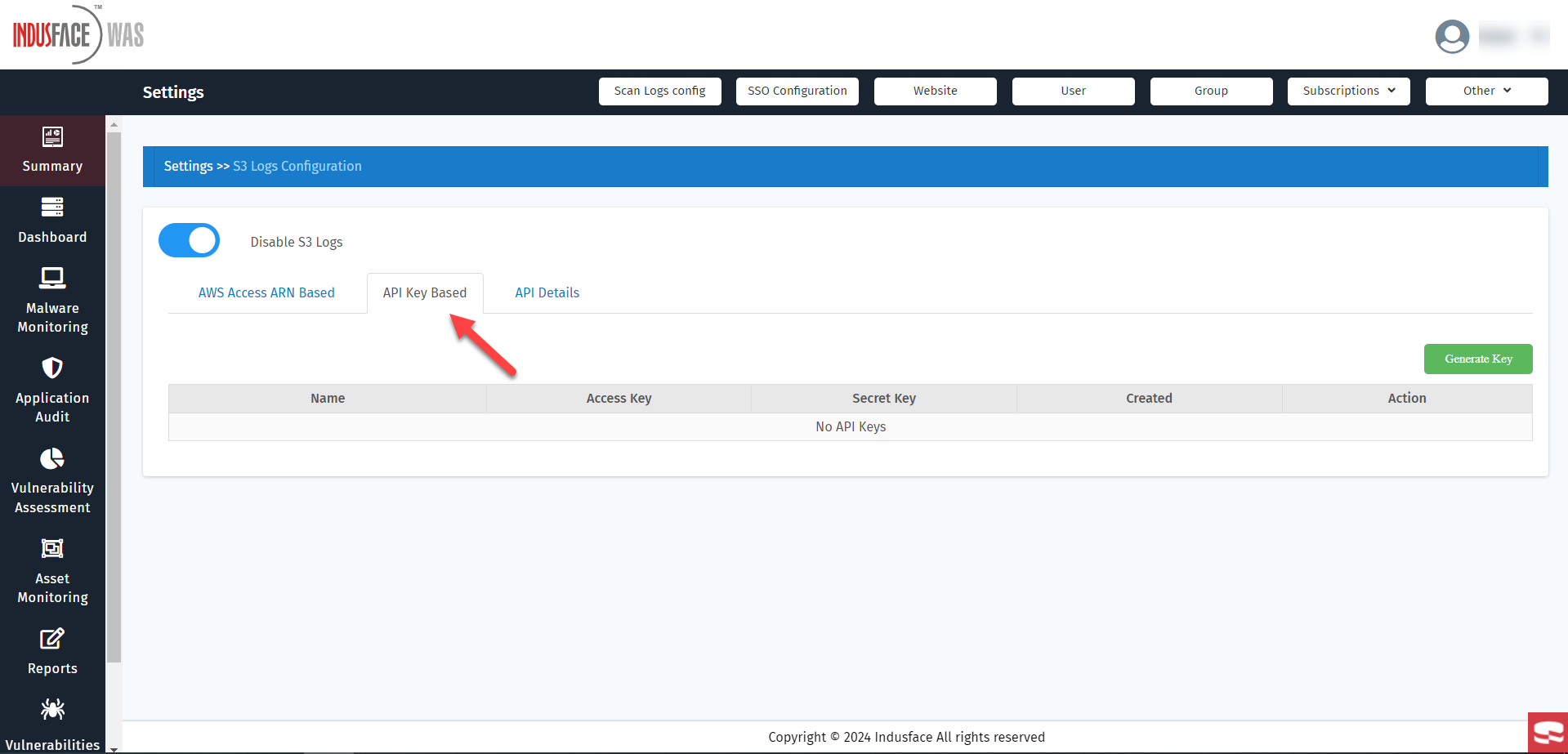
- Click **API Key Based.**
- Click on **Generate Key**.
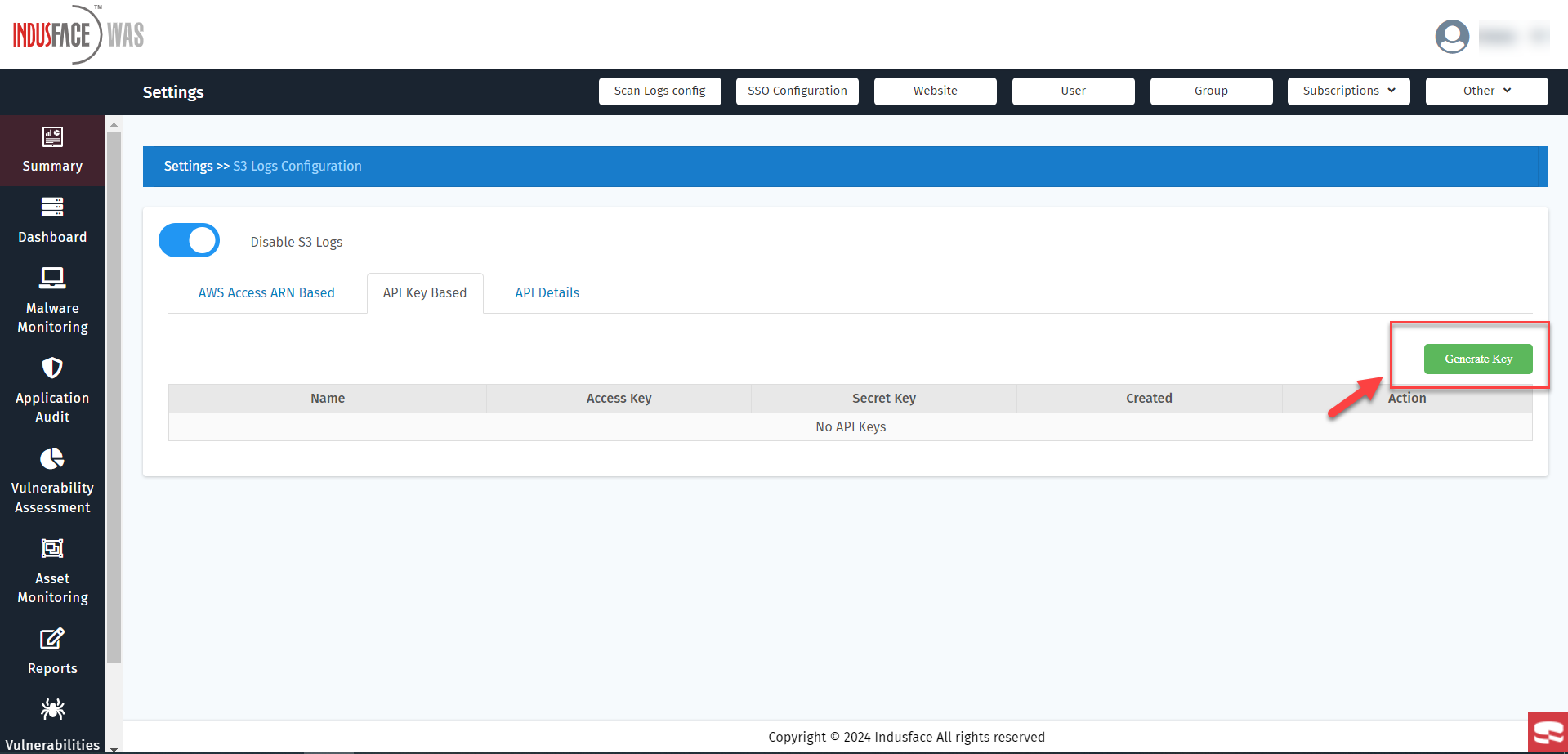
> Only the primary user has the authority to create the key, a measure taken for security purposes.
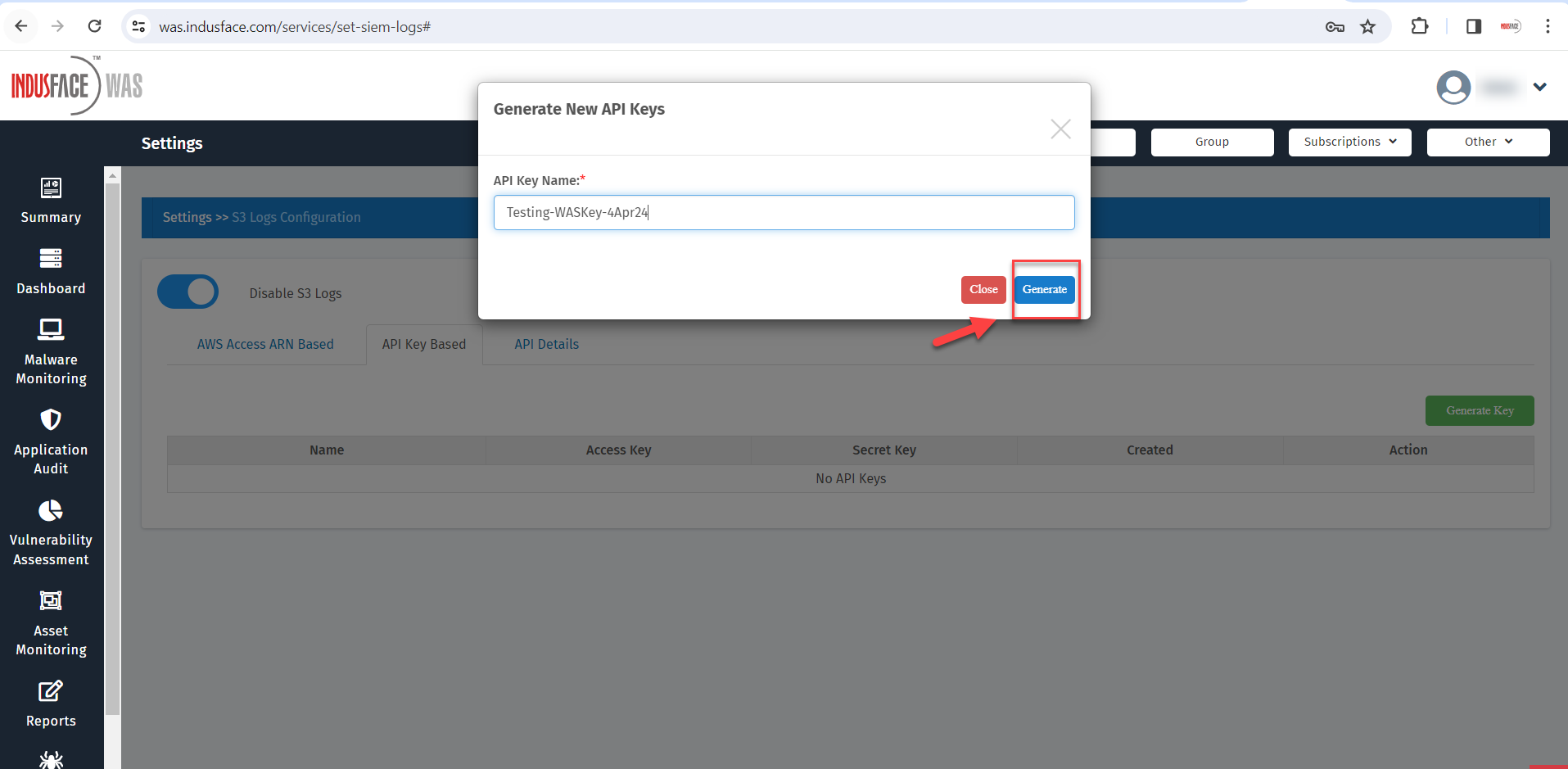
A prompt will appear requesting a name for the API key. Provide a name and click **Generate.**
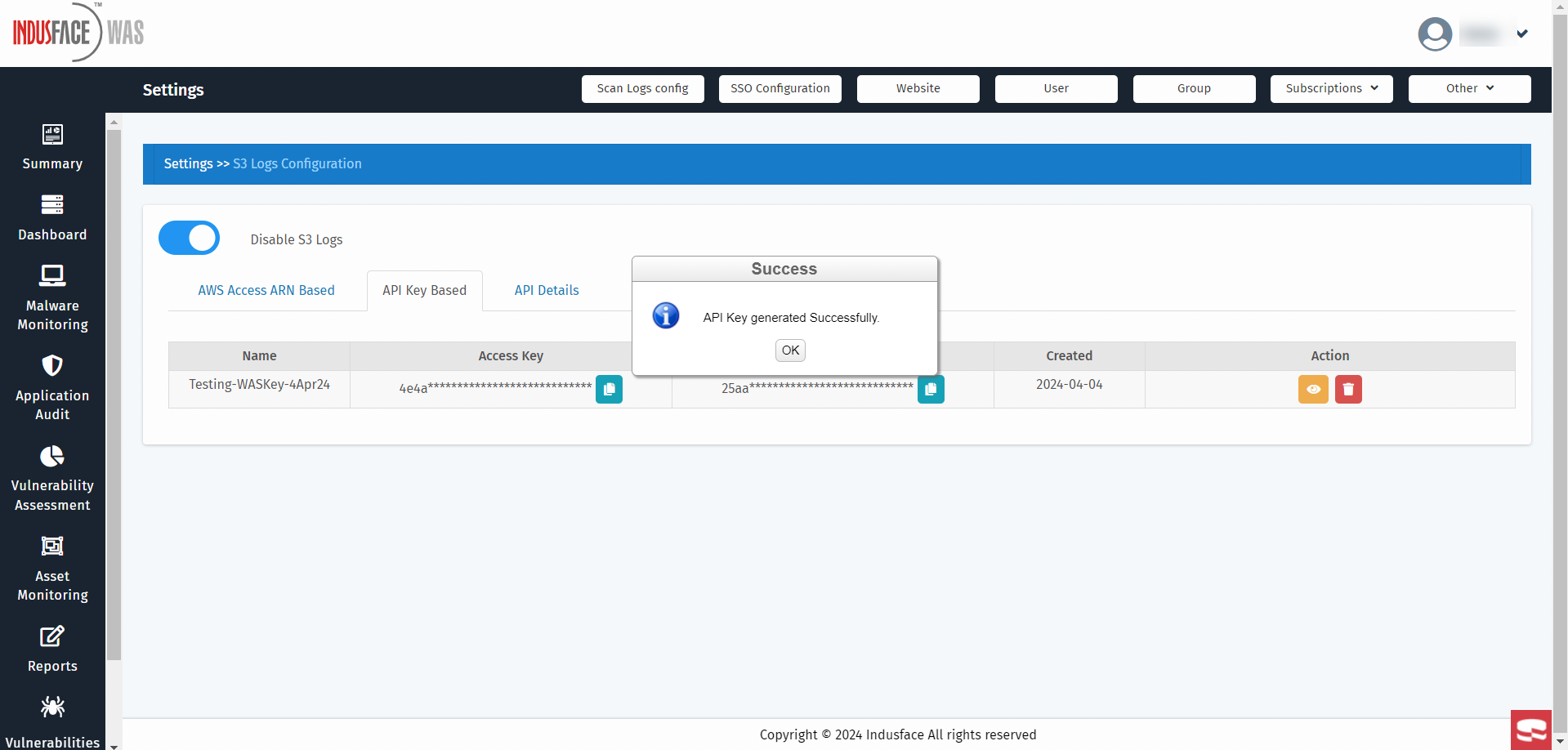
A confirmation message will appear indicating the successful creation of the API key.
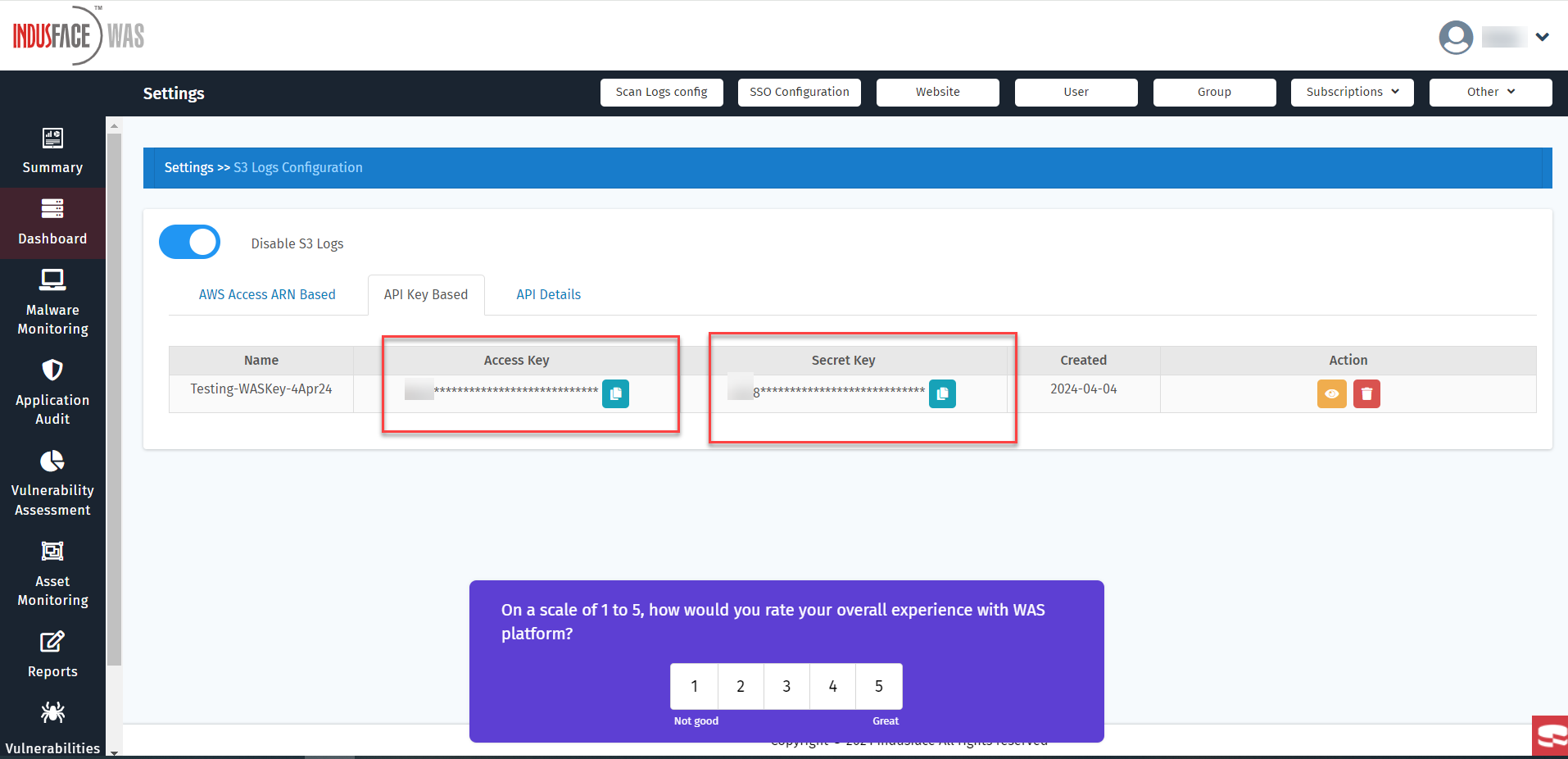
Upon successful generation, two keys will be provided: an **Access Key** and a S**ecret Key**. Ensure to securely copy and store these keys.
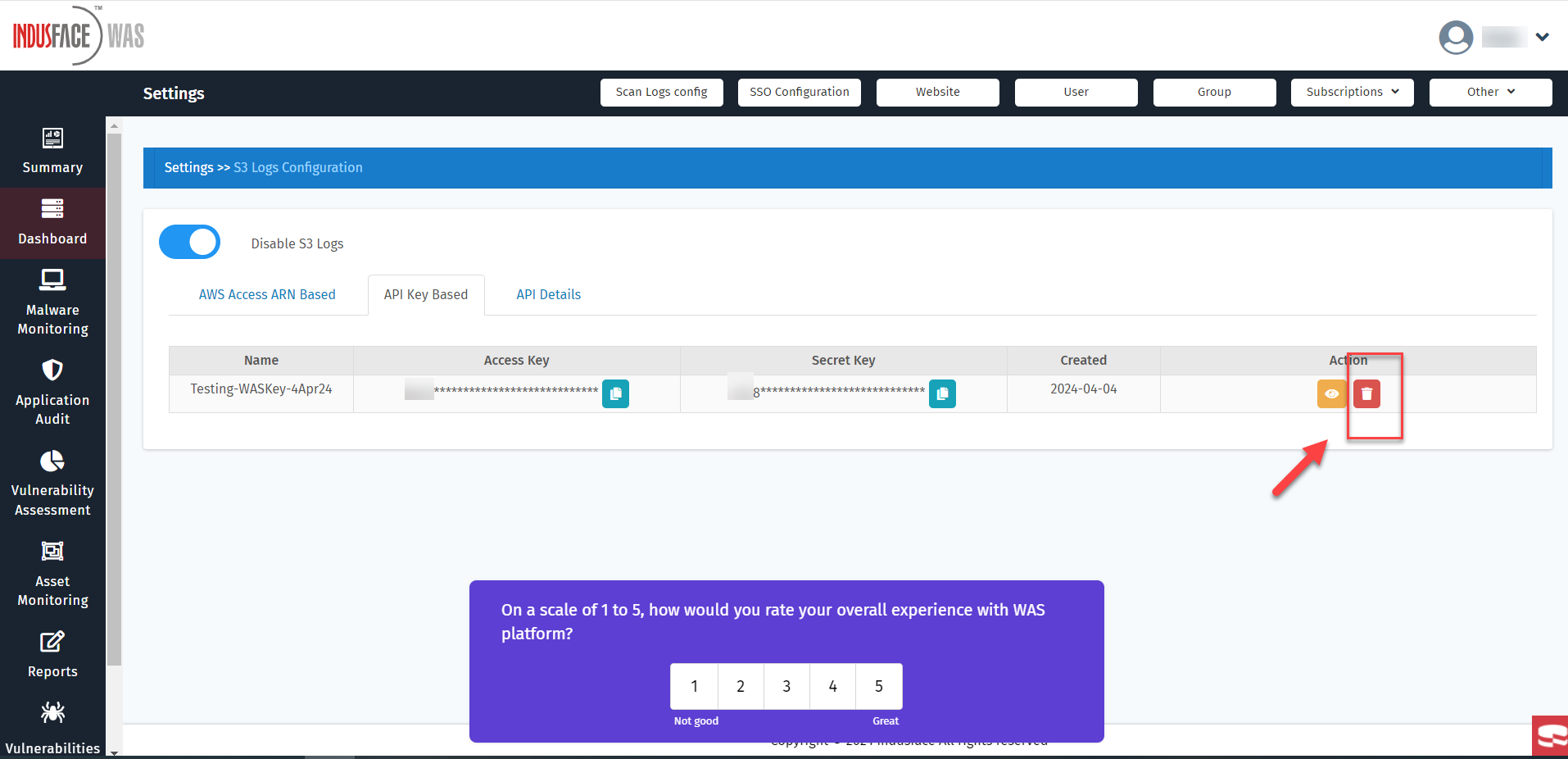
> There's a restriction of one key per account. If an additional key is needed, the existing one must be deleted before a new key can be generated.
- For further information about the API, navigate to the "**API Details**" tab.
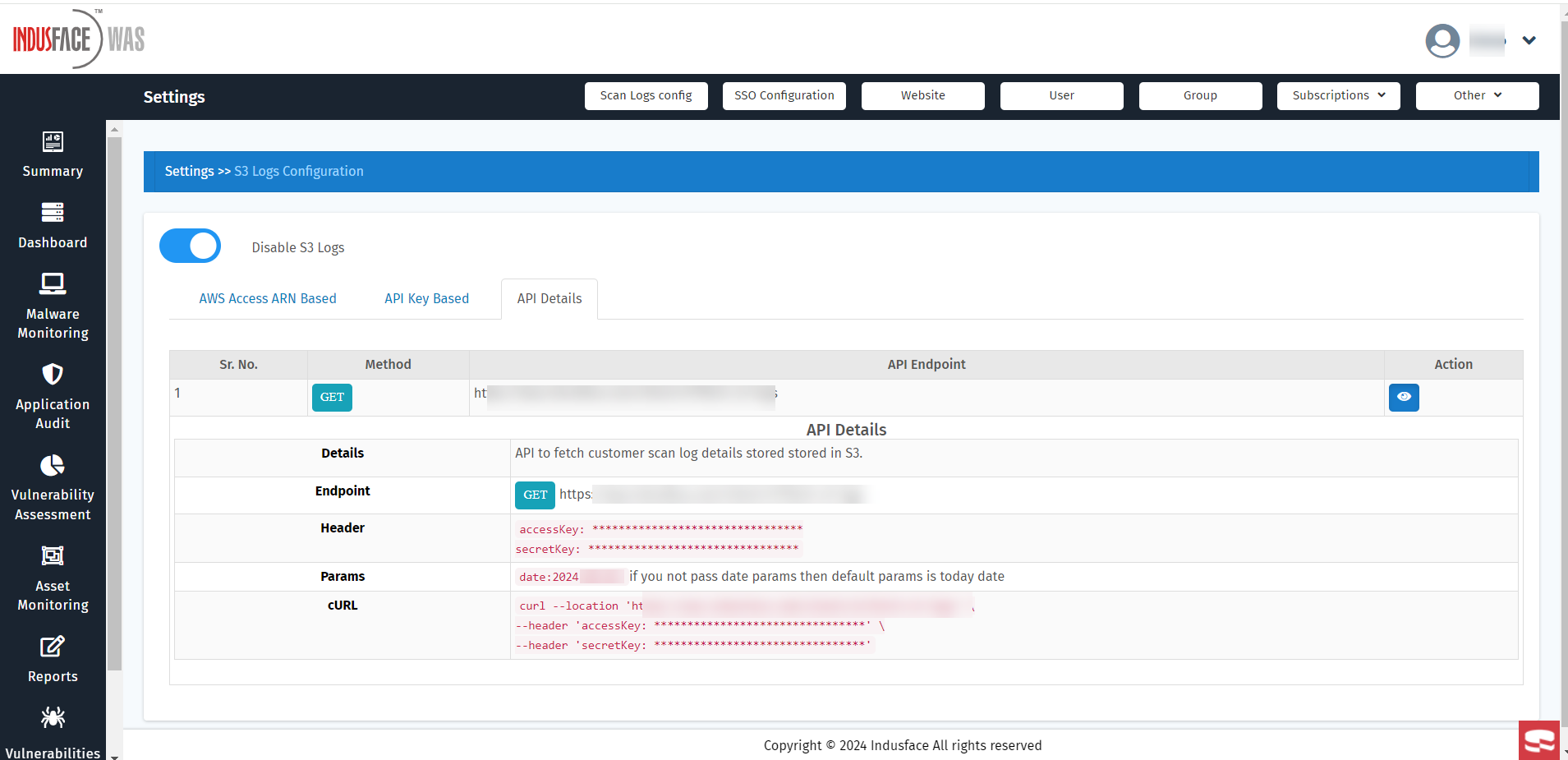
Customers will need to input the API key details (such as **Access Key** and **Secret Key**\[GC1\] ) into their tool settings to access logs from the Indusface S3 bucket.
### Use case 1: Get Specific Date Logs
**Purpose**: To fetch the scan logs for a specific date.
**Method**: GET
**URL**: http://was.indusface.com/client/v1/fetch-s3-logs
**Params**:
| date | Add date in the params section and add date value |
| --- | --- |
| Date format | Use the following date format to retrieve the logs: YYYY-MM-DD |
**Header parameters**
| **Header Parameter** | **Description** |
| --- | --- |
| accessKey | Use the Access Key value provided in the API Key Based table. |
| secretKey | Use the Secret Key value provided in the API Key Based table. |
#### Possible Response 1: Logs fetched successfully for the requested date
```javascript
{
"status": "OK",
"result": {
"success": "Data fetched successfully.",
"data": [
{
"ScanlogId": "12832867",
"ServicType": "AA",
"ServiceId": 78346,
"URL": "https://reports.example.com/as/aa/fail",
"ApplicationName": "",
"SealStatus": "PASS",
"TotalFoundVulnerabilities": 1,
"ScanStatus": "Scan Success Time Over",
"ScanDate": "2024-08-02",
"groups": [],
"Vulnerabilities": [
{
"UniqueAlertId": 3332161,
"Title": "Insecure Content Security Policy (CSP)/X-Frame-Options",
"Severity": "Medium",
"CVSS_Score": "6.1",
"OpenStatus": "NEW",
"FoundOn": "https://reports.example.com/",
"FoundDate": "2024-08-02"
},
{
"UniqueAlertId": 3332131,
"Title": "Possible Sensitive Directories/Files Detected",
"Severity": "Medium",
"CVSS_Score": "5.3",
"OpenStatus": "OPEN",
"FoundOn": "https://reports.example.com/web.config",
"FoundDate": "2024-08-02"
}
]
}
]
}
}
```
#### Possible Response 2: Scan Error
```javascript
{
"status": "OK",
"result": {
"success": "Data fetched successfully.",
"data": [
{
"ScanlogId": "12833389",
"ServicType": "AA",
"ServiceId": 77170,
"URL": "http://reports.example.info",
"ApplicationName": "Asset 001",
"SealStatus": "FAIL",
"TotalFoundVulnerabilities": 0,
"ScanStatus": "Scan Error",
"ScanDate": "2024-08-20",
"groups": [
"AAR"
],
"Vulnerabilities": []
}
]
}
}
```
#### Possible Response 3: No logs found for the requested date
```javascript
{
"status": "OK",
"result": {
"error": "No data logs found.",
"data": []
}
}
```
### Use Case 2: Get Specific Date Range Logs
**Purpose**: To fetch the scan logs for a specific date.
**Method**: GET
**URL**: http://was.indusface.com/client/v1/fetch-s3-logs
**Params**:
| fromDate | Enter the from date (Starting date) for S3 logs. |
| --- | --- |
| toDate | Enter the to date (End date) for S3 logs. |
> Use the following date format to retrieve the logs: YYYY-MM-DD.
**Header parameters:**
| **Header Parameter** | **Description** |
| --- | --- |
| accessKey | Use the Access Key value provided in the API Key Based table. |
| secretKey | Use the Secret Key value provided in the API Key Based table. |
#### Possible Response 1: Logs fetched successfully
```javascript
{
"status": "OK",
"result": {
"success": "Data fetched successfully.",
"data": [
{
"ScanlogId": "12832867",
"ServicType": "AA",
"ServiceId": 78346,
"URL": "https://reports.example.com/as/aa/fail",
"ApplicationName": "",
"SealStatus": "PASS",
"TotalFoundVulnerabilities": 31,
"ScanStatus": "Scan Success Time Over",
"ScanDate": "2024-08-02",
"groups": [],
"Vulnerabilities": [
{
"UniqueAlertId": 3332161,
"Title": "Insecure Content Security Policy (CSP)/X-Frame-Options",
"Severity": "Medium",
"CVSS_Score": "6.1",
"OpenStatus": "NEW",
"FoundOn": "https://reports.example.com/",
"FoundDate": "2024-08-02"
},
{
"ScanlogId": "12832920",
"ServicType": "AA",
"ServiceId": 78346,
"URL": "https://reports.example.com/as/aa/fail",
"ApplicationName": "",
"SealStatus": "PASS",
"TotalFoundVulnerabilities": 30,
"ScanStatus": "Scan Success Time Over",
"ScanDate": "2024-08-05",
"groups": [],
"Vulnerabilities": [
{
"UniqueAlertId": 3332161,
"Title": "Insecure Content Security Policy (CSP)/X-Frame-Options",
"Severity": "Medium",
"CVSS_Score": "6.1",
"OpenStatus": "OPEN",
"FoundOn": "https://reports.example.com/",
"FoundDate": "2024-08-05"
}
]
}
]
}
}
```
#### Scan Attributes
| **Attribute** | **Description** |
| --- | --- |
| ScanlogId | Every time a customer initiates a scan, an ID is generated for each new scan. |
| ServiceType | The type of scan service customer chooses. Example: AA- Application Audit, MM- Malware Monitoring, VA- Vulnerability Assessment. |
| ServiceId | For every customer, a unique Id is generated for the type of scan service they choose. |
| URL | The application URL is displayed here. |
| ApplicationName | Name of the application for which scan has been performed. |
| SealStatus | Pass- If an application successfully completes all three types of security scans such as AA, VA, MM.
Fail- If an application fails in any security scan and immediate action is required to patch high or critical vulnerability. |
| TotalFoundVulnerabilities | The total count of vulnerabilities found during the scan. |
| ScanStatus | Scan Success- Scan successfully completed within the scan time.
Scan Error- When site is unable to access by the scanner or data is unavailable
Partial Scan- For the given scan time website overall scan is not completed but partially done.
Scan Success Time Over- Scan successfully completed but scan time over. |
| ScanDate | Date of the scan performed. |
| groups | A group consists of different websites that have the same properties and characteristics. If the website is assigned to any group, the same group name is displayed here. |
#### Vulnerabilities Attributes
| **Attribute** | **Description** |
| --- | --- |
| UniqueAlertId | For every vulnerability found during the scan, an Id is being generated. |
| Title | Every vulnerability has a title |
| Severity | Vulnerability severity is given here, that is critical, high, and medium. |
| CVSS\_Score | CVSS\_Score is numerical representation of severity of vulnerability. |
| OpenStatus | New- When a vulnerability is found for the first time.
Opened- When a vulnerability is found, and patch is not done.
Closed- When a vulnerability is patched.
Re-Opened- When a patched vulnerability is opened again. |
| FoundOn | Application site where the vulnerability is found. |
| FoundDate | The date when the vulnerability is found. |